Why the Mediacoal Medical PPT Presentation Stands Out in Healthcare Communication
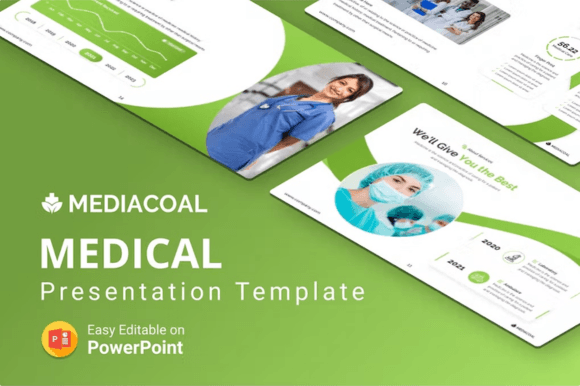
Medical presentations carry a weight that few other slide decks ever will. Whether you are pitching a new healthcare startup to investors, explaining a wellness program to corporate clients, or training staff on updated clinical protocols, clarity and credibility are non-negotiable. The Mediacoal Medical PPT Presentation was designed with exactly this level of seriousness in mind. It offers 35 unique slides, each carefully constructed to handle the nuanced demands of medical and health-related storytelling. What makes this template particularly useful is not just the number of slides but how they work together as a cohesive narrative toolkit.
Slide Variety That Matches Real-World Medical Messaging
When you first open the template, you immediately notice that it avoids the trap of repetition. Many presentation bundles pad their counts with minor color variations of the same layout. Here, every slide serves a distinct communication purpose. The Welcome To Our Medical slide sets a professional tone right from the start, using clean typography and balanced white space to signal trust. From there, the flow moves logically through sections that any healthcare presenter would need.
The About, Welcome Message, and About Services slides give you multiple angles for introducing your practice, department, or healthcare brand. Rather than cramming everything into one overcrowded slide, you can spread essential background information across purpose-built layouts. This keeps your audience engaged without overwhelming them with dense text blocks. The About Us slide variant works especially well for team-based practices where showing the human side of care matters. Meanwhile, the About Timeline slide lets you walk viewers through a chronological story—whether that is your organization's history, a patient journey, or the phases of a clinical trial.
Specialized Slides for Health and Wellness Presentations
One feature that sets this template apart from generic business decks is the inclusion of health-specific content structures. The About Exercise Feature slide addresses a growing need in both clinical and corporate wellness settings. As more healthcare providers emphasize preventive care and lifestyle medicine, having a dedicated visual space to discuss physical activity, rehabilitation exercises, or wellness routines proves remarkably practical. The design accommodates images, icons, and concise text in a way that feels instructive rather than promotional.
The Main Feature slides give you a platform to spotlight what truly differentiates your medical service, product, or research. Whether you are showcasing a new diagnostic device, a proprietary treatment methodology, or a patient engagement platform, these slides use bold visual hierarchies that naturally guide the eye toward your key message. The Creative Section slides take this further, offering more experimental layouts for when you need to break away from conventional grids and make a memorable impression during high-stakes presentations.
Mockup and Infographics Slides That Elevate Data Storytelling
Medical data can be difficult to present without losing your audience to confusion or boredom. The Mockup Slides included in the Mediacoal Medical PPT Presentation solve part of this problem by letting you place screenshots, app interfaces, or device images into realistic display frames. If you are launching a telehealth platform or demonstrating electronic health record software, these mockup environments provide immediate context that flat images cannot match.
Equally important are the Infographics Slides. Modern healthcare communication depends heavily on transforming raw statistics into digestible visual stories. The template includes multiple infographic layouts that handle everything from demographic breakdowns and epidemiological data to treatment efficacy comparisons. Instead of forcing you to build charts from scratch or import clunky Excel graphs, these slides offer pre-structured visual frameworks that maintain brand consistency while making numbers meaningful. A well-designed infographic slide can communicate patient outcome improvements, operational efficiency gains, or research findings far more effectively than bullet points alone.
Contact Us Features That Close the Communication Loop
Presentations in healthcare often aim to generate follow-up actions—scheduling consultations, directing patients to resources, or opening channels for professional collaboration. The Contact Us Features slides provide multiple layout options for presenting phone numbers, email addresses, physical locations, and even embedded map graphics. What makes these slides thoughtful is their flexibility. You can use them as a concluding slide, an interstitial reminder during longer presentations, or as a standalone reference that audiences photograph for later use.
Character Positions and Business Concepts That Expand Creative Range
A detail that rewards closer inspection is the inclusion of 36 character positions across the template. These illustrated figures appear in various poses and professional contexts, allowing you to represent patients, doctors, nurses, researchers, and administrators without relying on stock photography that can feel generic or staged. The character artwork maintains a consistent flat vector style that aligns with contemporary presentation aesthetics. This consistency matters because mixed visual styles can subtly undermine the polished impression you want to leave with medical audiences.
Complementing these characters are 30 business concepts rendered as amazing flat vector illustrations. These go beyond basic healthcare icons to cover broader business themes—growth, strategy, teamwork, innovation, and technology transfer. When you are presenting to hospital administrators, insurance executives, or potential partners, these business-oriented visuals help bridge the gap between clinical language and operational decision-making. The flat vector approach ensures that all graphics scale cleanly on the 16:9 aspect ratio HD screen, which remains the standard for modern conference rooms, lecture halls, and digital meeting platforms.
Master Layout and Technical Foundation for Consistent Branding
Anyone who has spent hours manually adjusting slide masters understands the value of a well-constructed foundational structure. The Mediacoal Medical PPT Presentation is built on a master layout that governs typography, color application, and element placement across every slide. This means that when you modify a heading style or accent color at the master level, those changes propagate throughout the entire deck. For healthcare organizations with strict brand guidelines, this feature alone saves considerable time and reduces the risk of off-brand slides slipping through during last-minute edits.
The master layout also supports the 15 premade color schemes included with the template. Color psychology plays a significant role in medical communication. Blues and greens convey calm and trust, while certain accent colors can draw attention to urgent information or key differentiators. Having fifteen thoughtfully curated palettes at your disposal means you can adapt the same slide deck for different audiences, settings, or branding requirements without redesigning anything from scratch. The light and dark background options extend this adaptability further. A light background works beautifully in bright conference rooms and printed handouts, while a dark background version excels in dimmed lecture halls or on screens where reducing eye strain matters for longer presentations.
Editable Elements and Drag-and-Drop Simplicity
Practical usability defines whether a template gets used repeatedly or abandoned after one frustrating attempt. The Mediacoal template emphasizes that all elements are fully editable. This extends beyond simple text replacement to include vector shapes, icon colors, image masks, and chart data. For medical presenters who are not design specialists, the easy drag and drop image functionality removes a common barrier. You can pull in photographs of your facility, portraits of your team, product images, or diagnostic visuals without wrestling with crop tools or aspect ratio distortion. Placeholder frames are already sized and positioned correctly, so your imported images inherit the professional composition built into each slide.
This drag-and-drop approach also accelerates the production timeline when you need to customize presentations for different speaking engagements. A slide deck prepared for a medical conference can be quickly adapted for a community health fair or an internal staff training session by swapping images and adjusting text within the same structural framework. The time saved compounds when you consider that healthcare professionals often need to update statistics, regulatory references, or seasonal health messaging throughout the year.
Typography, Fonts, and Support That Reduce Friction
Font licensing can become an unexpected headache when sharing presentation files across teams or presenting from different computers. The Mediacoal Medical PPT Presentation uses free fonts, which eliminates concerns about missing typefaces, substitution errors, or licensing violations. You can share the file with colleagues, upload it to cloud storage, or present from a loaner laptop with confidence that your typography will render as intended. This detail reflects a practical understanding of how medical presentations actually move through real-world workflows—often changing hands between administrators, clinicians, and communications staff before reaching their final audience.
The promise of fast and free support also deserves mention because even the most intuitive template can raise questions during customization. Whether you encounter a layering issue, need guidance on adapting a specific slide for an unusual use case, or want clarification on how a particular animation behaves, having responsive support reduces downtime. In healthcare settings where presentations sometimes need to be assembled under tight deadlines—a department head requesting slides for an unexpected board meeting, for example—this support infrastructure becomes a genuine asset rather than a marketing bullet point.
How These Slides Fit Into Everyday Medical Workflows
Consider a typical month in a mid-sized medical practice or healthcare consultancy. One week, you might prepare a patient education seminar using the infographic and exercise feature slides to explain cardiovascular health and physical activity recommendations. The following week, the same template pivots to an investor pitch deck, with mockup slides showcasing your patient portal interface and main feature slides highlighting competitive differentiators. Later, human resources might adapt the about and timeline slides for an orientation presentation welcoming new clinical staff.
This versatility stems from the template's design philosophy, which balances specialization with flexibility. The 35 unique slides provide enough variety to cover diverse communication scenarios without becoming so niche that you struggle to repurpose them. The inclusion of 30 business concepts alongside medical-specific content ensures that strategic, operational, and clinical messages all find appropriate visual homes within the same template ecosystem. The 16:9 aspect ratio guarantees compatibility with virtually every modern display environment, from large-format screens in hospital conference centers to tablet devices used during one-on-one consultations.
For organizations that regularly present to mixed audiences—patients, referring physicians, payers, and regulatory bodies—the light and dark background toggle becomes more than a cosmetic choice. It reflects an understanding that different contexts demand different visual tones. A dark background slide deck can lend gravitas to a research presentation at a medical symposium, while the light version of the same content feels accessible and reassuring when shared in a patient-facing newsletter or community workshop.
The cumulative effect of these design decisions is a presentation tool that respects the complexity of healthcare communication. Rather than forcing medical professionals to adapt generic business templates to fit clinical narratives, the Mediacoal Medical PPT Presentation starts from a place of understanding what makes health-related messaging unique. It acknowledges that trust, clarity, and authority must coexist on every slide, whether you are explaining treatment protocols, showcasing outcomes data, or inviting collaboration. By combining thoughtful slide architecture with practical editing features and reliable support, this template earns its place in the workflow of anyone who regularly translates medical expertise into visual stories.