Modern Tech Industrie Company Profile
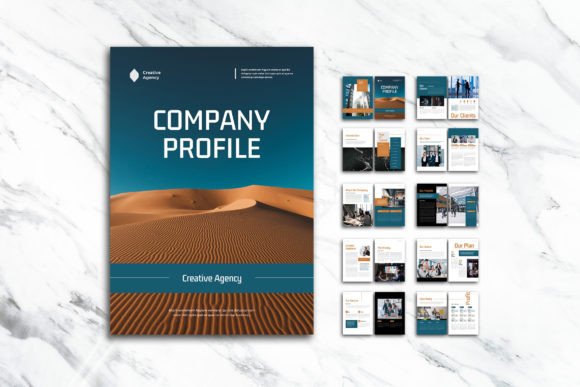
Presenting a company's identity through print requires more than just assembling text and images on a page. It demands a careful balance of visual hierarchy, consistent branding, and professional polish. The Modern Tech Industrie Company Profile template addresses these needs by providing a structured yet flexible foundation for creating A4-sized company profiles, capability statements, and business introductions using Adobe InDesign.
What makes this particular layout worth considering is its focus on the interplay between imagery, infographics, and written content. Many templates lean heavily toward one element at the expense of others. This one intentionally creates space for all three, making it suitable for businesses that need to communicate technical details, data points, and brand personality within the same document.
Why Document Structure Shapes Reader Perception
When a potential client or investor opens a company profile, they form impressions within seconds. The layout either signals professionalism or raises doubts about attention to detail. A well-structured document guides the eye naturally through information, preventing the cognitive fatigue that comes from dense, unstructured text blocks.
The Modern Tech Industrie Company Profile template spans twelve pages, including a front cover and back cover. This page count hits a practical sweet spot. It provides enough room to tell a meaningful story about a business without becoming unwieldy or expensive to print. Each page serves a distinct purpose, and the organized layers within the InDesign file make it straightforward to locate and modify specific elements without disturbing the overall design.
For teams that regularly prepare proposals, credentials documents, or project portfolios, having a reliable starting point reduces the friction of beginning from a blank canvas. The template establishes a visual language that can be adapted across different projects while maintaining consistency.
Integrating Imagery and Data Without Visual Clutter
One of the persistent challenges in document design is presenting quantitative information alongside photographs without creating visual chaos. Charts, timelines, and percentage indicators need breathing room to be legible. Photographs require adequate spacing to make an impact. When these elements compete for attention, neither succeeds.
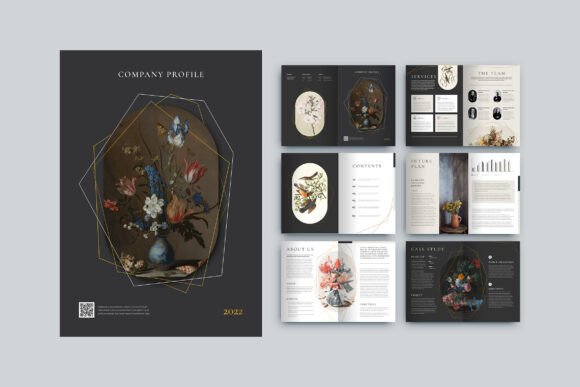
This template addresses that tension through its page layouts, which appear to allocate distinct zones for different content types. Infographics sit in dedicated areas where they can be read independently. Image placeholders are positioned to complement rather than fight with surrounding text. The result is a document where data and visuals support each other rather than creating confusion.
The smart layer structure in the InDesign file plays an important role here. Designers working under tight deadlines can quickly isolate the elements they need to update, whether that involves swapping placeholder images for original photography or adjusting infographic colors to match updated brand guidelines. This organizational approach may seem like a small detail, but it materially affects how efficiently someone can produce a finished document.
Technical Specifications That Affect Print Quality
Anyone who has sent a document to a commercial printer only to receive proofs with unexpected color shifts understands why technical settings matter. The Modern Tech Industrie Company Profile template uses CMYK color format, which aligns with standard offset and digital printing processes. This reduces the likelihood of color discrepancies between screen previews and physical output.
The 300 DPI resolution setting ensures that images and graphics reproduce with sharp detail on paper. Combined with the 3mm bleed specification, the template accounts for the trimming variations that occur during professional printing. These are not glamorous features, but they prevent common printing disappointments such as white edges along trimmed borders or blurry logo reproductions.
The A4 dimensions of 29.7cm by 21cm make this template suitable for markets where A4 is the standard document size, including much of Europe, Asia, Australia, and other regions. Businesses operating internationally may find this particularly useful, as A4 documents often need reformatting when sourced from primarily US-letter-based template libraries.
Font Selection and Typography Flexibility
The template uses fonts sourced from DaFont or Google Fonts, both of which offer free licensing options. This removes a common obstacle where templates reference premium typefaces that require separate purchases before the document can be used as designed. Designers can download the specified fonts at no cost and begin working immediately.
Typography plays a substantial role in how professional a document appears. Letter spacing, line height, and font weight combinations create a visual rhythm that either encourages reading or prompts the reader to skim and move on. The template's typography appears to be selected with readability in mind, supporting the document's purpose as a communication tool rather than just a decorative piece.
For users who wish to substitute their own brand fonts, the editable InDesign files allow for typeface changes across the document. The organized layer structure means that updating font selections in paragraph and character styles can propagate changes consistently throughout all twelve pages.
Who Gains the Most Value From This Layout
Small to medium-sized technology companies preparing capability statements for government or enterprise procurement processes will likely find this template immediately useful. These documents often require a balance of technical specification presentation, project photography, and corporate information that matches what the template offers.
Creative agencies and freelancers designing client profiles or case study documents may also benefit. The template's emphasis on imagery presentation suits portfolio-style content where visual evidence of past work carries significant weight. Being able to present project photos at full bleed with accompanying text organized nearby creates a narrative flow that portfolio documents need.
Startups preparing investor-facing materials represent another natural user group. The infographic capabilities within the template allow for the clear presentation of market data, growth metrics, and competitive positioning without requiring the design team to build chart formats from scratch.
Educational institutions and nonprofit organizations producing annual reports, program summaries, or donor communications could adapt the template for their purposes. While the name references tech industries, the layout structure is versatile enough to accommodate any sector where visual and data-driven storytelling matters.
Understanding the Scope of Customization
The template package includes INDD, IDML, and PDF formats. The IDML file format provides backward compatibility with older InDesign versions, which is helpful for teams that have not upgraded to the latest Creative Cloud release. The PDF serves as a quick reference for the intended final appearance.
Customization covers all the expected areas: color schemes can be adjusted throughout, text can be rewritten, images can be replaced, and page order can be rearranged. The smart layer structure means that even users who are not deeply experienced with InDesign can make meaningful edits by selecting the correct layer and working within it.
However, users should approach customization with a clear understanding that the design's effectiveness comes partly from the restraint built into the layouts. Adding too many additional elements or overriding the established spacing can undermine what makes the template work. The most successful adaptations tend to respect the underlying grid and typographic hierarchy while changing surface elements like colors, images, and specific copy.
What Is Not Included and Why That Matters
The preview images shown in demonstrations of the template are for presentation only and do not come bundled with the download. This is standard practice for template products and reflects licensing realities. The photographs used in previews typically come from stock photography sources with usage restrictions that prevent redistribution.
For users, this means budgeting time or resources to source appropriate imagery. The benefit is complete creative control over the visual identity of the final document rather than using generic placeholder photos that might also appear in another company's materials. Original photography, purchased stock images, or in-house graphics can all fill the image placeholders.
This also means that the template's value centers on its structural design rather than its preview content. Evaluating the template based on layout quality, typography handling, and organizational logic is more indicative of the final result than being drawn to attractive preview images that will not appear in your finished document.
Practical Scenarios Where the Template Addresses Real Needs
Consider a consulting firm responding to a request for proposal that requires a company profile as a supporting document. The deadline is tight. Starting with a structured template means the team can focus on articulating their qualifications and relevant project descriptions rather than debating margin widths and font pairings late into the evening.
A manufacturing company attending an international trade show might need printed capability documents that look professional alongside competitors from larger markets. Using a template with proper print specifications prevents the awkward situation where a document looks amateurish in a setting where first impressions influence business relationships.
A nonprofit seeking grant funding often needs to present impact data alongside beneficiary stories and organizational information. The infographic integration within this template allows metrics to be displayed clearly while photographs of program activities add the human element that funding applications benefit from.
Making an Informed Choice About This Resource
The Modern Tech Industrie Company Profile template serves a specific function well: providing a professionally structured, print-ready foundation for twelve-page A4 company documents. It does not attempt to be an all-purpose design solution, and that focused scope is part of its practical value.
Users who will benefit most are those who already have, or are willing to invest in, Adobe InDesign and who possess at least basic proficiency with the software. While the template is designed to be easy to use, InDesign itself has a learning curve. Complete beginners may need to allocate time for familiarization before achieving the results they envision.
For those whose needs align with what the template offers, it can reduce the time between concept and finished document while improving the consistency and professionalism of the output. For those with significantly different requirements, such as longer documents, different page sizes, or highly specialized content structures, comparing multiple template options before committing is a prudent approach.
The availability of free fonts and the inclusion of IDML format for compatibility suggests thoughtful consideration of user accessibility. The technical print specifications demonstrate attention to the practical realities of producing physical documents. These details indicate a template built by designers who understand both the creative and production sides of document creation.
Ultimately, a company profile is often one of the first tangible representations of a business that a prospective client or partner encounters. Investing effort in presenting information clearly, professionally, and memorably through a well-structured layout is a decision that supports broader business development goals. The right template makes that investment more efficient and the outcome more predictable.