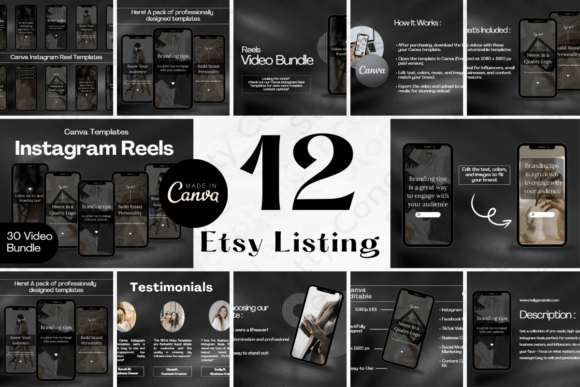
Make Every Product Stand Out with the 12-Page Etsy Listing Canva Template V.4
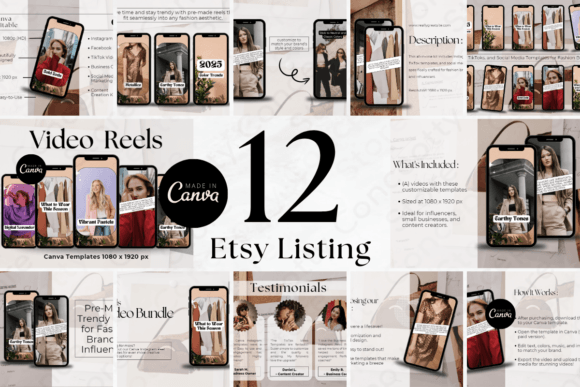
When you’re selling online, the first few seconds a visitor looks at your listing often decide whether they stay or click away. It’s not just about the product itself—it’s about how clearly and compellingly you can present it. The 12-Page Etsy Listing Canva Template V.4 was built with exactly that challenge in mind. It’s a ready-to-edit set of twelve landscape-oriented Canva pages, each 3000 pixels wide by 2250 pixels tall, giving you a clean, neutral modern aesthetic and a minimalist design that adapts to almost any product category.
Rather than locking you into a single rigid layout, this template offers a variety of visual structures: hero frames that spotlight your product, close-up grids for texture and detail, lifestyle scene holders, infographic sections for specifications, and dedicated areas for reviews and testimonials. That flexibility is why makers keep reaching for it—not only for Etsy listings but also for marketing kits, Instagram posts, fashion lookbooks, and client-friendly style guides.
The Real Difference a Cohesive Template Makes
Anyone who has tried to piece together a product listing from scratch knows how much mental energy goes into spacing, alignment, font pairings, and simply deciding what goes where. Meanwhile, your shop looks inconsistent, and that inconsistency can quietly erode a buyer’s confidence. Cohesive visual storytelling on Etsy—or on any platform—helps shoppers feel like they’re dealing with a thoughtful brand, not a random vendor. The 12-Page Etsy Listing Canva Template V.4 gives you that visual consistency without requiring you to build it from the ground up.
By using these pre-structured pages, you naturally create a flow that guides a potential customer through the story of your product: the problem it solves, what makes it different, why people love it, and how it fits into daily life. That flow, when repeated across multiple products, becomes a signature that loyal customers start to recognize—whether they find you on Etsy, Instagram, Facebook, or Pinterest.
Who Actually Uses This Template
You might assume it’s only for full-time Etsy sellers, but the real audience is much broader. Fashion brands that want to post trend-driven reels on Instagram use the landscape format as a storyboard-style carousel. Creators who sell digital printables repurpose the pages as preview slides that explain licensing and print sizes. Freelancers offering social media services use the template to produce ready-to-schedule content for clients who sell handmade jewelry, candles, stationery, or clothing. Even bloggers and educators integrate these pages into lead magnets or mini e-book style marketing kits because the neutral aesthetic doesn’t fight their own branding.
Because the template is built in Canva, there’s no steep learning curve. People who need to batch-create content for a product launch or seasonal update can clone the pages, swap in their photos, tweak the colors, and have a professional-looking set in under an hour.
Etsy Shop Owners: Turning Browsers into Buyers
Imagine you sell hand-poured soy candles. A typical Etsy listing might show a main photo and a few secondary shots, but the platform keeps scrolling behind a compact view. If you’re not intentionally layering information, a visitor might never see your scent notes, burn time, or what the packaging looks like. The 12-page template lets you design a deliberate sequence: page one grabs attention with a warm lifestyle shot, page two isolates the candle jar with a minimalist background, page three uses an infographic to show dimensions and burn hours, page four features a customer quote about how the lavender scent fills a room, and so on. The result is a listing that answers questions before they’re asked, reducing hesitation.
For digital paper sellers, the same template works differently. Instead of lifestyle photos, a creator might use the grid layouts to show seamless patterns up close, then add pages that explain terms—like personal versus commercial use—and follow with mockup previews on notebooks or phone cases. The varied layouts prevent the listing photos from looking repetitive, which keeps a buyer scrolling through all twelve images, and that extended engagement often correlates with higher conversion on Etsy.
Beyond Etsy: Social Media and Marketing Kits
The landscape orientation—3000px by 2250px—fits beautifully as an Instagram carousel or a Facebook album, where people swipe through content piece by piece. Several fashion brands have adopted templates like this to create “trendy reels” style static posts: a fabric close-up, a styled flat lay, a sizing chart turned into a clean infographic, and a closing slide with a direct call-to-action. Because the template already structures information visually, the brand can replicate that exact format week after week, building a visual language that followers come to expect.
Service providers, too, find unexpected value. A freelance photographer might use the template not to sell a physical item, but as a marketing kit: portfolio highlights, package options, client testimonials, and an “about me” page. The neutral design puts the focus on the images while the layout makes each piece of information digestible. Since it’s all editable in Canva, the photographer can quickly tailor a version for wedding clients and a different one for brand shoots without redesigning from scratch.
Customization Considerations Before You Start
While the template is ready to use out of the box, getting the most out of it means thinking about your own visual identity first. If your brand already has a warm, earthy feel, you might replace the template’s default neutral palette with soft terracottas or sage greens. The fonts, too, can be adjusted—stick with no more than two typefaces to maintain the clean look that makes these pages effective. Overdecorating can undercut the minimalist advantage, so it’s often better to add your brand elements sparingly rather than crowding every page.
Another small but important point: because Etsy listing photos are cropped to a square in search results, you’ll want to ensure that key elements—the product, a headline, your brand mark—stay within a safe center zone that survives the crop. The 3000x2250 canvas gives you plenty of breathing room to compose images with that crop in mind, but it’s worth testing a few thumbnails before you publish.
How 12 Pages Solve 12 Different Problems
Each page inside the template serves a distinct purpose, and that’s where the real design thinking becomes visible. Instead of a single generic placeholder multiplied twelve times, you get layouts tuned for different types of content:
- Hero image layouts for first impressions
- Close-up panels that highlight texture, stitching, or material
- Lifestyle scene frames that show the product in use
- Infographic blocks for ingredients, dimensions, or timelines
- Comparison charts subtle enough for a story-driven listing
- Testimonial pages with room for star ratings and quotes
- “How to use” sequence pages for kits and bundled products
- Specification sheets that feel more visual than a list
- Color or variant showcase grids
- Behind-the-scenes or maker story snapshots
- Care instruction cards with icon-based guides
- Closing call-to-action pages that invite a follow or purchase
That range means you never have to force a piece of information into an ill-fitting format. When a product has rich specifications, you use an infographic page. When it’s driven by emotional appeal, you lean on lifestyle and testimonial pages. The template simply gives you a place for everything.
A Closer Look at the Landscape Format
The 3000px by 2250px size might seem like a small technical detail, but it has practical implications. Landscape images offer a broader canvas, making it easier to include text alongside product shots without crowding. For fashion brands showing head-to-toe outfit details, the width allows the garment to be displayed fully while still having space for size information or a short note about the fabric. When repurposed for a Facebook post or a Pinterest pin, that same landscape proportion performs better in feeds where vertical images get truncated or scale awkwardly.
It’s also worth noting that the high resolution (3000 pixels wide) keeps everything crisp on retina screens, which matters when a customer zooms in to inspect details. What they see shouldn’t pixelate—it should reassure them of quality.
Infographics, Reviews, and Trust Elements
One of the often-overlooked benefits of this template is how naturally it integrates trust signals. Instead of pasting a text-only review at the end of a description, you can place a curated testimonial on a dedicated page with a clean design that matches the rest of your visuals. When a buyer sees a series of reviews displayed alongside product photos, they register social proof without needing to scroll to a separate review section. The same goes for an ingredient infographic for skincare or an “item quality attributes” breakdown for handmade bags—information that could feel dry becomes part of the visual storytelling.
These elements matter because buyers on Etsy and similar platforms often make decisions based on a gut-level sense of trust. A well-presented specifications page signals that you know your product thoroughly and aren’t hiding anything. A testimonial page with a real photo (if privacy allows) and a quote turns an abstract five-star rating into a human moment.
When Templates Become Time Machines
Anyone who manages an online shop while juggling production, shipping, and customer messages knows that design time often gets squeezed. The 12-Page Etsy Listing Canva Template V.4 cuts down the most repetitive part of that work: deciding how to arrange photos and copy. Once you’ve customized the master set once, you can duplicate it for future products, swap images, adjust the color accents if needed, and export within minutes. That consistency across your entire storefront not only saves hours but also makes your shop look more trustworthy, almost like a micro-brand rather than a random collection of listings.
For people launching multiple products at once—maybe a seasonal collection of six candle scents or a batch of coordinating printable wall art sets—the time savings compound quickly. Rather than revisiting design decisions each morning, you can move directly to writing copy and arranging photos, which is often where your creative energy is best spent.
Questions to Ask Before You Download
No template fits every need perfectly, so here are a few practical checks. First, do you have a Canva account that allows you to use this type of template without restrictions? Most sellers provide clear license information, but it’s worth confirming. Second, is your product visually complex or does it need very specific instructional diagrams that exceed the scope of the 12 provided pages? In most cases, the layouts handle a wide range of products, but if your item requires detailed assembly guides or videos embedded directly, this template is a starting point—not a multimedia replacement. Third, consider your brand’s personality: the neutral modern aesthetic works widely, but if your shop thrives on maximalist, colorful chaos, you may need to invest a bit more time tweaking colors and textures to match your vibe.
That said, the neutrality is often a strength. It allows the product to be the hero and doesn’t fight for attention. Many of the most successful Etsy shops and small fashion brands intentionally go clean with their listing visuals because it lets the work speak, and a minimalist structure often appears more premium to buyers.
If you’ve ever found yourself staring at a blank canvas wondering how to structure a listing, or frustrated that your product photos don’t seem to tell a compelling story when arranged together, the 12-page system gives you a starting point that has been tested across categories as varied as apparel, home decor, digital downloads, and cosmetics. The format works because it respects buyer psychology—people scan, they look for proof, they want to imagine ownership—and each page nudges that journey forward. With a little customization, it becomes a quiet, effective sales partner that runs behind every image a customer sees.