A Designer's Honest Take on the Tech Help and Support Icon Pack
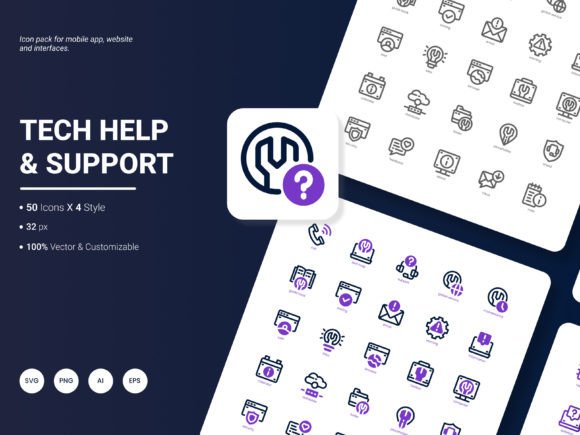
There's something quietly satisfying about opening a folder of icons and immediately knowing half of them will fit your project. That's the feeling I got when I first browsed through the Tech Help and Support Icon Pack. Two hundred icons, all centered around the themes of assistance, troubleshooting, digital guidance, and the everyday tech support moments we've all lived through. It's not just a collection of symbols. It's a visual shorthand for the questions, frustrations, and solutions that define modern digital life.
What makes this particular set stand out is how it captures the human side of tech support. You'll find icons representing live chat agents, help desks, knowledge bases, remote assistance, screen sharing, troubleshooting gears, error messages, and those reassuring checkmarks that signal a problem solved. They don't feel cold or overly corporate. They feel like they were designed by someone who has actually called a support line at 11 PM.
When Visual Language Does the Heavy Lifting
Think about the last time you landed on a website's help center. What did you see? Probably a search bar, maybe some generic stock photos of smiling people wearing headsets, and a wall of text. Now imagine that same page with a carefully chosen icon next to each category. A stylized chat bubble for live support. A graduation cap for tutorials. A shield for security help. Suddenly the page breathes. The Tech Help and Support Icon Pack gives you exactly that kind of breathing room. The icons don't just decorate; they direct attention, reduce cognitive load, and make the page feel more trustworthy within seconds.
For mobile app developers, the scenario shifts slightly. Screen real estate is precious, and every pixel matters. The pack's inclusion of four distinct styles means you can match your app's personality without compromise. A fintech app might lean toward the clean, minimal line style to convey precision and professionalism. A children's educational app could use the filled, colorful versions to feel approachable and friendly. It's the same icon, same concept, but the emotional tone changes completely.
Who's Really Using These Icons Day to Day
It's easy to assume icon packs are only for graphic designers. That's far from true. A customer success manager building an onboarding presentation might grab a few PNGs to visually map out the support journey for new hires. A product manager could drop SVG files into wireframes to quickly communicate feature ideas without writing a single word of explanation. Even a freelance writer creating an e-book about remote IT solutions might use the JPG versions as section dividers or concept illustrations.
The versatility comes largely from the six file formats included. AI and EPS files for print designers who need infinite scalability. SVG for web developers who care about load times and responsiveness. PNG for quick drag-and-drop into slides or documents. PDF for sharing proofs with clients who don't have design software. JPG for when you just need something lightweight and universally compatible. This isn't a pack that locks you into one workflow. It meets you where you are.
Real-World Scenarios Where These Icons Shine
Let's talk about a few concrete situations. You're building a SaaS dashboard that includes a support ticketing module. Users need to differentiate between open tickets, resolved issues, and escalated cases. With 200 icons at your disposal, you can assign distinct visual markers for each status. A clock icon for pending, a checkmark for resolved, a flag for escalated. The icons from the Tech Help and Support Icon Pack are designed with these exact workflows in mind, so you're not stretching a generic set to fit a specialized need.
Another scenario: a university IT department is redesigning their student portal. They want to highlight services like password resets, Wi-Fi troubleshooting, software downloads, and virtual lab access. Instead of designing custom icons from scratch, they can pull directly from the pack, keeping visual consistency across every service. The editable nature of the files means they can tweak colors to match the university's brand palette in minutes, not hours.
Then there's the marketing team preparing an infographic about cybersecurity best practices. They need icons that represent firewalls, data encryption, phishing warnings, and secure connections. The Tech Help and Support Icon Pack covers these concepts and more. Because the icons share a cohesive design language, the infographic looks polished and professional, even if multiple team members contributed to it.
The Quiet Power of Style Variety
Four styles might not sound like a lot until you start mixing and matching across projects. There's a flat, outline style that works beautifully for minimalist interfaces. A filled, solid style that commands attention in presentation slides. A duo-tone version that adds just enough personality without overwhelming the content. And a more detailed, illustrative style that suits educational materials or blog headers. Having all four in one pack means you're not hunting through multiple marketplaces trying to find matching sets. The consistency is built in.
This matters more than you'd think. I've seen projects where icons were pulled from three different sources, and the mismatch was subtle but jarring. Line weights varied. Corner radii didn't match. Some icons felt slightly rotated compared to others. The Tech Help and Support Icon Pack eliminates that problem entirely because every icon across all four styles was created by the same hand. The proportions, the spacing, the visual weight, it all aligns.
What Makes the Editing Experience Different
Editable icons aren't always as flexible as advertised. Some packs come flattened or outlined in ways that make color changes tedious. Here, the AI and EPS files give you proper vector layers. You can isolate individual elements, recolor them, remove details you don't need, or even combine parts from different icons. Want to take the chat bubble from one icon and merge it with the gear from another? The source files make that possible without fighting the artwork.
For SVG users, the same flexibility applies in a code-friendly format. You can inline the SVG directly into HTML and animate individual paths with CSS. Imagine a help button where the question mark pulses gently on hover, or a success checkmark that draws itself when a form submits correctly. These small interactions add polish that users feel, even if they don't consciously notice.
Content That Reflects Modern Support Realities
The icon selection doesn't just cover generic tech concepts. It digs into the specific services and platforms people actually use. You'll find icons for video conferencing tools, cloud storage, password managers, VPN connections, chatbot interfaces, and device synchronization. These aren't abstract metaphors. They're direct visual representations of the tools your audience interacts with daily. That familiarity speeds up comprehension. A user doesn't need to decode what a symbol means when it looks like the thing they're trying to find.
This is especially important for analytics reports and dashboards where quick scanning is essential. An executive reviewing a quarterly support report shouldn't have to pause and interpret what each icon represents. The visual language should be immediately obvious. The Tech Help and Support Icon Pack leans into that clarity without becoming generic or boring.
Points Worth Considering Before You Dive In
No resource is perfect for every single situation, and it's worth being honest about that. Two hundred icons is generous, but if your project requires hyper-niche concepts like quantum computing or blockchain-specific support flows, you might still need to supplement with custom work. The pack covers mainstream tech support and help desk themes thoroughly, but edge cases exist in every industry.
Also, while the four styles are cohesive, they won't necessarily match every brand identity out of the box. You'll likely need to adjust colors, and that's expected. The good news is that the editable formats make this straightforward. Just budget a little time for customization rather than assuming a direct drop-in fit.
File organization is another small but meaningful detail. With six formats and four styles spread across 200 icons, the folder structure can feel dense if you're new to managing design assets. Taking a few minutes to familiarize yourself with the naming conventions and organization upfront saves frustration later when you're on a deadline and need to locate a specific file quickly.
How Different Roles Extract Different Value
A web developer might primarily care about the SVG files and how clean the code output is. They'll appreciate icons that don't bloat page size and render crisply at any resolution. A content creator building YouTube thumbnails or social media graphics might live in the PNG folder, grabbing high-resolution exports that drop directly into Canva or Photoshop. A print designer preparing a conference banner will gravitate toward the AI and EPS files, scaling icons to enormous sizes without a hint of pixelation.
Small business owners who handle their own website updates might never open the vector files at all. They'll use the JPG and PNG versions, inserting them into WordPress pages or email newsletters. The pack serves all these people differently, and none of them are using it wrong.
The Update Question Worth Asking
The team behind this icon pack actively welcomes suggestions for their next update, which tells you something about their approach. They're not treating this as a static product that ships and gets abandoned. If you've ever wished for an icon that perfectly captures a concept like biometric authentication failures, multi-factor verification steps, or smart home device support, this is your chance to shape what comes next. That open line of communication is rare and worth taking advantage of.
When you think about the sheer range of places these icons can live, websites, mobile apps, slide decks, printed handouts, video overlays, email signatures, the value becomes clear. The Tech Help and Support Icon Pack isn't revolutionary in concept. Icon packs have existed for decades. But it's thoughtful in execution. It anticipates the visual problems that support and help content creators face, then solves them with a curated, flexible, and genuinely stylish set of tools. And sometimes, that's exactly what a project needs.
What you ultimately do with the icons depends on your context. Maybe you'll use ten of them regularly and the other 190 sit in reserve for future needs. Maybe you'll find creative ways to combine them that the original designer never envisioned. Either way, having a cohesive, well-organized, multi-format resource at your fingertips changes how quickly you can move from idea to implementation. And in the world of tech help and support, where questions never stop arriving and users always need guidance, speed and clarity are everything.